
Submitted by akirashinigami on Tue, 04/13/2010 - 07:32
Revision of How to Rip an Audio CD from Sun, 01/16/2011 - 21:23
The revisions let you track differences between multiple versions of a post.
This manual shows how to rip audio CDs with the music management application that comes with Trisquel: Exaile.
Instructions
- Insert the audio CD into your computer's CD-ROM drive.
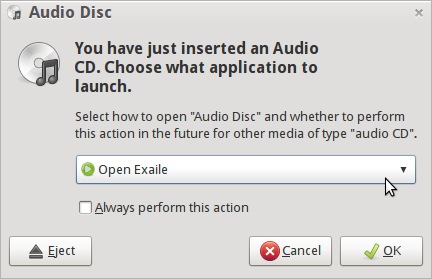
- By default, a dialog window should pop up saying that an audio CD was inserted, asking you what you want to do. Choose Open Exaile and click OK.
- If not, open Exaile manually from the Main Menu under Sound & Video → Exaile Music Player.
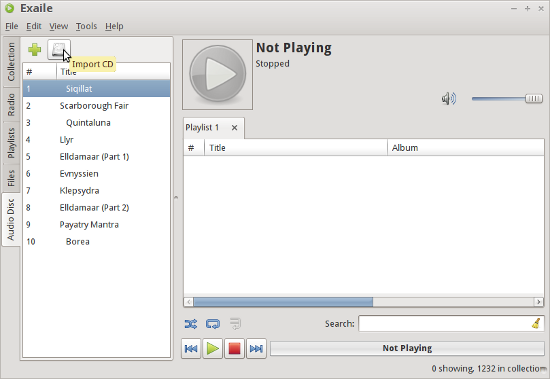
- There will be a vertical tab on the left-hand side called Audio Disc. Click on it.
- Click the Import CD button (the one with a picture of a hard disk drive) on the toolbar near the top of the window.
- Wait for Exaile to finish extracting the files. That's it! You're done!
Configuration
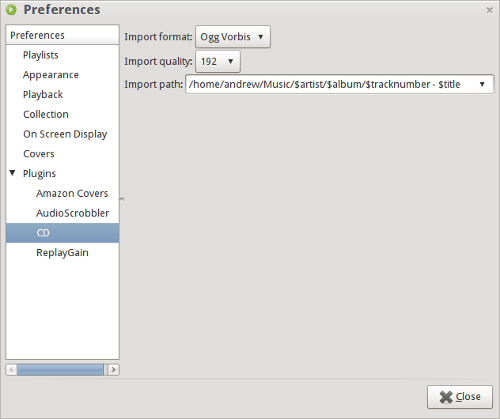
By default, the tracks will be saved to /home/(your username)/(artist)/(CD title) as 160 kbps Ogg Vorbis audio files. If you wish to change these settings, go to Edit → Preferences, then select the CD entry under Plugins. You can configure where files will be saved, the naming scheme for files, and the audio format to be used.