
Revision of How to create a LiveUSB from Fri, 07/10/2009 - 15:06
The revisions let you track differences between multiple versions of a post.
For those who want to travel with Trisquel in their pockets or install Trisquel in a ultraportable driverless Laptop, or any other use that fits.
1 - Download FUSBi from here.
2- Install the required dependencies, either through Synaptic or Terminal.
Through terminal:
sudo apt-get install mtools p7zip-full
3 - Insert a USB device on your computer. The USB Device must have at least 1 GB.
4 - Format your USB Device. Don't forget to make backups of it's content first! In case you have something important on it!
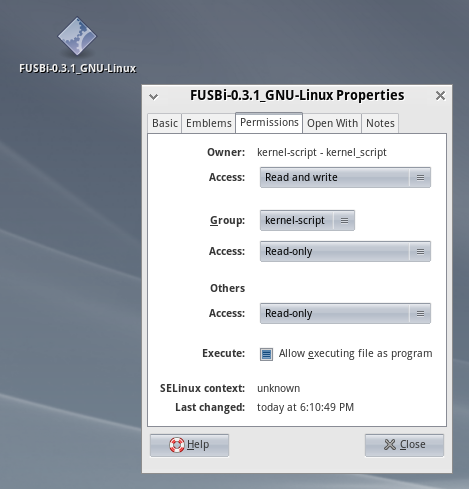
5 - Give permission to FUSBi to become a executable file:
[fusbi_permissions.png]
6 - Create a ISO image from your Trisquel CD.
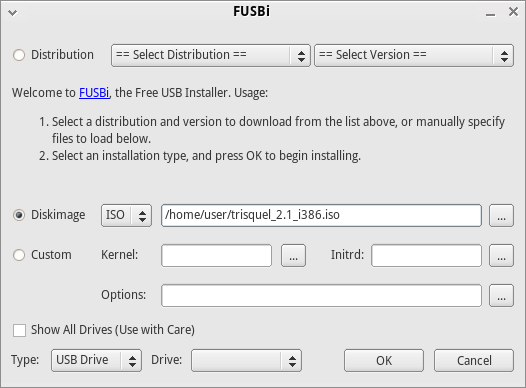
7 - Execute FUSBi by double-clicking on it. Input your root password.
8 - On the window that appears, on "Diskimage | ISO", choose the Trisquel ISO image you created, press OK, now just wait for the process to finish and you're ready to go.
[fusbi_gui.png]
Resources
Instalacion de GNU/Linux Desde Dispositivo USB
| Attachment | Size |
|---|---|
| fusbi_permissions.png | 79.53 KB |
| fusbi_gui.png | 31.66 KB |